Build Once: Logo Animation Video for Teams, 4 Cross Platform Modes

For a quick, single-use logo animation video, grab a template or online maker and export an MP4 within the hour. For a motion system that has to work consistently across your website, app, and every social platform for years, hire a studio to build it once, correctly, with every format included. Your timeline, budget, and where the file needs to live decide which path fits.
TL;DR:
For long-term, consistent branding across multiple platforms, hire a studio to create a motion system, not just a one-off animation.
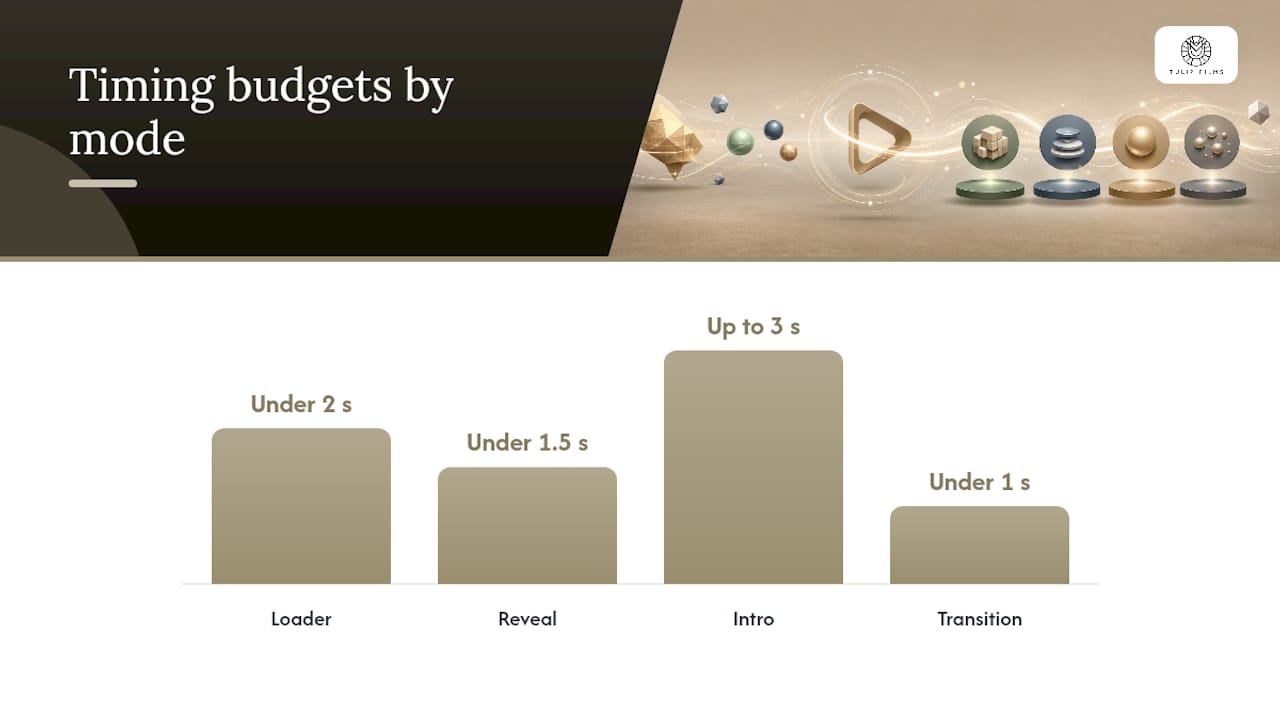
Timing budgets are strict: loaders under 2 seconds, reveals under 1.5 seconds, intros up to 3 seconds, and transitions under 1 second.
Export formats must match platform needs, with Lottie or WebM for web, ProRes or MOV with alpha for editing, and MP4 for social media.
Stagger element entrances by 8 to 14 frames to achieve a natural, designed feel rather than a flat, abrupt move.
Avoid DIY templates or online makers without alpha support or still-frame deliverables if your logo will appear long-term across diverse channels.
Table of Contents
What Is a Logo Animation Video, and When Do You Need One?
A logo animation video is a short, moving version of your static logo, usually built as an intro, a loading loop, a looping watermark, or a transition between scenes. It’s not a full brand video. It’s the two-to-five-second signature that appears before or during other content, and it does one job: make your mark register in a viewer’s memory faster than a still image can.
The term gets used loosely online. Some people mean an animated logo intro (the clip that opens a YouTube video), others mean a logo reveal animation (a more elaborate unveiling used in a brand launch), and others just want a loop for a website loader. All three fall under logo motion design, the broader discipline of applying movement, timing, and sound to a static brand mark. Knowing which mode you actually need saves you from buying the wrong deliverable.
The four practical use cases you’ll run into:
Intro: opens a video, sets tone, usually under 3 seconds.
Loader: plays while a page or app loads, needs to loop cleanly under 2 seconds.
Loop: a continuous background element, often on a website hero or trade-show screen.
Transition: bridges two scenes or sections inside a longer video, typically under 1 second.
Each mode has a different timing budget and a different export requirement, which is why “just animate the logo” is rarely a one-size-fits-all brief. A studio approaching an event video project, for instance, will often need a version of the same animated logo intro sized for both the opening titles and a lower-third bug that reappears throughout the footage.
Where to Get an Animated Logo Video: Templates, Makers, and Stock Options
Three practical sources exist outside hiring someone directly, and all trades speed for control differently.
Template marketplaces sell After Effects project files with your logo swapped in. Quality runs high, because most templates come from working motion designers, but you need After Effects or a compatible editor (some templates now ship for DaVinci Resolve or Premiere with mogrt plugins) to actually customize them. Expect to adjust color, timing, and text, but not the fundamental animation structure. If the template’s stagger pattern doesn’t suit your logo’s shape, you’re stuck with it.
Online makers are browser-based tools where you upload a logo, pick a preset animation, and export. Speed is the entire pitch: five minutes from upload to download, no software installation. The tradeoff shows up at export time. Many browser-based makers can’t produce alpha-channel transparency or Lottie files, only flattened MP4s with a background color baked in, which limits where you can actually use the result.
Stock animated logo downloads are pre-made, generic animations you drop your logo into with minimal editing. They’re the fastest option and the least brand-specific. Fine for a placeholder or a same-day social post, risky for anything meant to represent your identity long-term.
Before buying or downloading from any of these, check:
Does the license permit commercial use and resale-adjacent use (ads, client work)?
Can you export at the resolution and frame rate your platform requires?
Does the tool support alpha channel or transparent background export?
What happens to your uploaded logo file after you cancel or stop paying? Review the vendor’s privacy statement before uploading anything sensitive, since brand assets sitting on a third-party server are a data exposure most teams never think to check.
How to Build or Commission a Correct Animated Logo Video
Getting a usable animated logo video, whether you’re doing it yourself or briefing a studio, follows the same five steps in order. Skipping the first one is the single most common reason a finished animation looks wrong once it’s live.
Prepare your assets first. Export your logo as a vector file (SVG or AI, not a flattened PNG), with text and icon as layered, separate elements. Include a light-background version and a dark-background version, since most brands need both, plus a monochrome variant for restrictive placements.
Pick the mode you actually need. Decide upfront whether this is a loader, an intro, a loop, or a transition. Each has a different timing budget: loaders should resolve in under 2 seconds, reveals in under 1.5 seconds, full intros can stretch to 3 seconds, and transitions need to stay under 1 second or they’ll feel like they’re stalling the content around them.
Set your customization details before animating. Decide on stagger timing between elements, your easing curve (ease-out reads as confident, linear reads as robotic), whether text needs to hold long enough to be legible, and whether the file will ever carry synced audio.
Export for every platform you’ll actually use. A file destined for a website needs different specs than one going into a video editor’s timeline.
Review against the checklist below before calling it done.
Pro Tip: Stagger each element’s entrance by 8 to 14 frames instead of animating everything at once. That small offset is what makes a reveal feel designed rather than dumped on screen, and it costs nothing extra to build.
Export checklist by destination:
Web: Lottie JSON (small file size, scales perfectly) or WebM with alpha for a transparent background.
App: Lottie for interactive, code-driven animation; MP4 as a fallback for platforms that don’t support Lottie.
Social: Square or vertical MP4, correct aspect ratio per platform, audio baked in if used.
Video editors: ProRes or MOV with alpha channel, so editors can drop it directly onto any background without a green screen workaround.
If you want a second opinion on sequencing before you commit to a final cut, a storyboarding walkthrough is worth reading even for something this short. The planning logic is identical whether the final piece runs three seconds or three minutes.
Which File Format Should You Actually Export?
The format question has a simple answer once you know where the file is going, but most DIY attempts export one file and hope it works everywhere. It won’t.
For web use, Lottie is the current favorite among designers because the file stays tiny (often under 50KB) and scales to any screen size without quality loss, though it demands an After Effects pipeline with the Bodymovin or LottieFiles plugin to produce. WebM with alpha is the practical fallback for web when Lottie isn’t feasible. It supports transparency and works in most modern browsers at a reasonable bitrate around 8 to 10 Mbps for a short clip.
For handoff to editors, ProRes 4444 or MOV with an alpha channel is the standard. It preserves transparency losslessly, so whoever is cutting your promotional or event footage can drop your logo animation onto any background without a keying headache. MP4 (H.264) remains the universal fallback for social platforms and anywhere alpha isn’t supported, but note that MP4 doesn’t carry transparency, so you’ll need a solid background baked into that export.
One deliverable is non-negotiable regardless of format: a high-resolution still frame, exported as a transparent PNG or vector. Animations fail to load in some email clients, some slow connections, and some embedded contexts. The still frame is what appears instead, and it’s what keeps your brand recognizable when the motion doesn’t play.
Format-to-use-case quick reference:
Website hero or loader: Lottie, fallback WebM with alpha
App splash screen: Lottie, fallback MP4
Editing timeline handoff: ProRes/MOV with alpha
Social post or story: MP4, correct aspect ratio
Anywhere motion might fail: transparent PNG still frame
What Separates a Motion System From a One-Off Clip
A single animated clip is a showreel piece. A motion system is a set of modes (intro, loader, loop, transition) that all share the same easing curve, the same timing logic, and the same defined still frame, so your logo feels consistent no matter where a viewer encounters it. Most DIY attempts skip this and end up with three different animations that each move at a different speed, which reads as sloppy even to viewers who couldn’t tell you why.
Timing budgets exist for a reason beyond taste. A loader that takes longer than 2 seconds to resolve starts to feel like the page is broken. A transition that lingers past 1 second interrupts the content it’s supposed to bridge. Keep this table nearby when briefing anyone:
Mode | Timing budget |
Loader | Under 2 seconds |
Reveal | Under 1.5 seconds |
Intro | Up to 3 seconds |
Transition | Under 1 second |
The single biggest amateur mistake is uniform timing, animating every element of the logo to move at the same speed and start at the same instant. It reads as a slide transition, not a designed reveal. The fix is staggering: offset each element’s entrance by a handful of frames so the eye has a sequence to follow rather than a single flash. This is staging, and it’s the difference between motion that guides attention and motion that just happens on screen.
There’s real research behind why staggered, moderately varied motion outperforms both a flat cut and a chaotic one. A 2025 study on unpredictability in motion design found that a moderate degree of unpredictability in animation captures attention best, following an inverted U shape: too little movement bores viewers, too much overwhelms and actually reduces sustained attention. A short stagger sequence sits in that effective middle zone; an overly busy reveal with elements flying in from six directions does not.
Timing isn’t the only variable that matters. Motion has to match the brand it represents. Branding research on brand-congruent design points out that animation inconsistent with a brand’s personality, flashy bounce effects on a conservative law firm’s mark, for instance, weakens the overall brand impression even when the animation itself is technically well made. Match the easing curve to your brand’s tone before you match it to what looks cool in a template preview.
What Tulip Films Delivers for a Cross-Platform Logo Animation
A studio build exists to solve the problem templates can’t: consistency across every place your logo will ever appear, delivered once, correctly, without you having to re-export anything six months from now when a new platform needs a new format.
Typical studio deliverables for an animated logo project include:
Storyboards or motion frames showing the sequence before animation begins.
A master project file plus rendered exports in ProRes/MOV with alpha, Lottie JSON, WebM with alpha, and MP4.
A transparent PNG still frame for fallback contexts.
A short usage guide covering when to use which file and at what minimum size.
We generally recommend commissioning a studio build once a business needs the logo working across more than two or three contexts at once, website, app splash screen, event signage, and social simultaneously, or once brand consistency over multiple years matters more than getting something usable today. A single social sting for one campaign rarely justifies the cost. A brand identity that needs to hold up across a growing product and a growing marketing footprint usually does.
Realistic timelines for a studio-built animated logo run from a few days for a simple loop to two or three weeks for a full motion system with multiple modes, and most projects go through two to three review rounds: an initial storyboard approval, a rough animation pass, and a final polish before delivery. That review cycle is where staggering, timing, and brand fit actually get corrected, which is exactly the step a template purchase skips entirely.
If your logo animation is part of a bigger production, corporate video, a product launch, or promotional advertising, it’s worth briefing the motion work alongside the rest of the project rather than treating it as an afterthought tacked onto post-production. Readers curious about how animation affects viewer engagement more broadly can see the mechanics explained in our piece on animation in explainer videos, which covers similar attention principles at a longer format.
A Straight Answer for Busy Teams and Non-Designers
If you need one social sting for one campaign, use a template or online maker. Nobody needs a full motion system for a clip that runs once and disappears. If your logo has to live on your website, in an app, and across a dozen social formats for years, that’s a studio job, and trying to DIY it usually costs more in re-work than it saves upfront.
Three red flags when evaluating a template or freelancer: no still-frame deliverable offered, no mention of alpha channel export, and a portfolio that shows only finished MP4s with no sense of the underlying timing logic. Before you commit to anything, confirm you’ll get a vector source file, a transparent still frame, and at least two export formats. If a vendor can’t answer those three questions clearly, keep looking.
— Pieter
Get a Cross-Platform Animated Logo Built Once, Correctly
A dedicated studio is the alternative to piecing together templates, online makers, and freelance one-offs. Instead of re-exporting a new file every time a platform changes, a studio delivers one motion system in multiple formats, built to match your brand’s personality rather than a generic preset.
[
This usually includes a project file, alpha-channel ProRes and WebM exports, a Lottie file for web or app use, and a transparent still frame for fallback, all provided together instead of pieced together from multiple sources. If your team is planning a product launch, a rebrand, or just tired of a logo animation that looks different on every platform, start by pulling together your vector logo files and a short brief on where the animation needs to live. From there, browse the production portfolio for examples of finished brand motion work, check the pricing overview to scope your budget, and reach out to schedule a consultation on your logo animation project.
Sources
Recommended
