Teleprompter Interview: Cue Card Playbook and 15° Eye Line

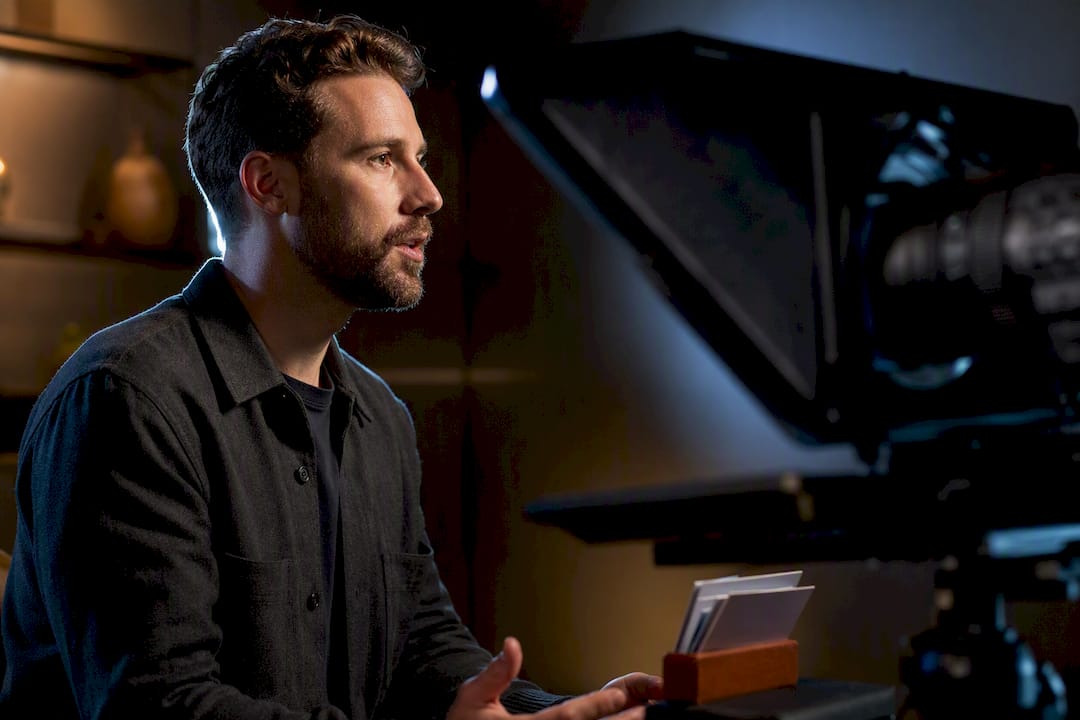
Use a teleprompter for a recorded or remote interview strictly as a cue card, never a full script, and keep the prompt as close to your camera lens as possible. Bullet-length prompts protect your key messages without making you sound rehearsed. Rehearse at a calibrated scroll speed before you ever hit record, and the rest of the setup falls into place.
TL;DR:
Using a teleprompter as a cue card with key prompts ensures natural delivery and prevents sounding rehearsed during recorded interviews.
Keep the prompter within 15 degrees of your lens and test lighting, font size, and mount stability to maintain a natural eye line and avoid distractions.
Set scroll speeds between 120 and 140 words per minute, and rehearse with interruptions to ensure smooth pacing and familiarity with your cues.
Trim scripts to cue-card length, highlight key words, and practice from memory to avoid sounding scripted and to develop an authentic tone.
Use high-quality audio equipment, close-mic, and quiet environments to prevent audio issues, and implement a backup recording to mitigate common technical failures.
Table of Contents
How Do You Write a Script for a Teleprompter Interview?
Full sentences on a teleprompter almost always sound like full sentences read off a teleprompter. The fix is brutal editing: cut every prepared answer down to 3 to 5 bolded key messages plus 2 to 3 bridge phrases you can lean on when a question drifts off-topic.
Write one idea per line and bold the words that matter, so a single glance delivers a single thought instead of a clause you have to parse mid-sentence. For behavioral questions, structure the cue around STAR: a headline cue for the situation, one line for the action you took, one line for the result. That structure keeps you talking in your own words instead of reciting.
A workable cue format looks like this:
Headline: the one-sentence version of your point (“Led the redesign that cut onboarding time in half”)
Detail: one supporting fact or number, not a paragraph
Takeaway: the line you want the viewer to remember
Bridge cue: a short phrase like “which connects to…” for pivoting back if the question moves elsewhere
If you’re prepping talking points for a company interview or brand video, the same discipline applies. This topic is covered in more depth in guidance on tightening scripts and messaging in corporate films, which walks through trimming dense copy before it ever reaches the camera.
Where Should the Teleprompter Sit for Natural Eye Contact?
Eye line is the single biggest giveaway that someone is reading. Get the geometry wrong and even great cues look like a hostage note.
Keep the text within about 15 degrees of the lens on a video call. Beyond that angle, viewers can tell you’re looking somewhere else, even if it’s subtle.
Mount a phone or tablet as close to the webcam as physically possible. For laptop interviews, that often means propping the device directly above or below the built-in camera, not off to the side.
Set font size and line width so one glance equals one idea. If you have to move your eyes twice to finish a line, the text is too wide or too small.
Test at your actual recording distance, not sitting closer to check your own screen. What reads clearly at arm’s length may blur at three feet.
Check for glare and reflections on the device screen before recording. A single overhead light angled wrong will bounce straight off a phone screen and force you to squint, which reads as discomfort on camera.
Confirm the mount is steady. A wobbling phone taped to a stack of books shows up as micro-movement in your eye line even if you don’t notice it while talking.
Lighting and prompter placement interact more than people expect. There is a short guide on fixing common lighting problems in corporate interviews that’s worth a look before your setup day.
What Scroll Speed Should You Use for a Teleprompter Interview?
For most recorded interviews, 120 to 140 words per minute reads naturally on camera. Conversational interview formats can run slightly faster, 120 to 150 WPM, since the back-and-forth pacing feels less formal than a straight-to-camera address. Slow that number down when you’re covering technical material. Numbers, acronyms, and unfamiliar terms need more time to land.
Pro Tip: Record yourself reading for 20 seconds, count the words, multiply by three to get your per-minute rate, then adjust the prompter speed until that number matches your target. Two or three passes usually gets you there.
Mode selection matters as much as raw speed:
Voice-activated scrolling works best when you expect to ad-lib or when an interviewer might cut your answer short. The prompt waits for your voice instead of racing ahead.
Words-per-minute or timed modes suit interviews where you need a consistent, repeatable length, like a video testimonial or a scripted opening statement.
Fixed speed only works well once you already know your own rhythm cold, which usually means you’ve rehearsed the piece multiple times already.
Choosing the right scrolling mode up front saves you from chasing a scroll bar mid-sentence, which is one of the fastest ways to sound like you’re reading.
How Do You Rehearse So You Don’t Sound Scripted?
The single best fix for “teleprompter voice” costs nothing: speak your first sentence entirely from memory before your eyes ever touch the prompt. That first-sentence ownership sets your natural tone for the rest of the answer, and it’s much harder to slip into a flat reading cadence once you’ve already started talking like yourself.
From there, a simple three-pass rehearsal routine works well:
First timed rep: read through your cues cold, mark where you stumble or where the pacing feels off, and note pauses or words you want to emphasize directly on the script.
Second timed rep: run it again with those pause and emphasis marks in place, checking that your total time lands close to your target.
Third rep with interruptions: have someone toss in an unexpected follow-up question mid-answer, forcing you to bridge back to your cue instead of freezing.
That third rep matters more than the first two combined. Interviews rarely go exactly as scripted, and a prompter that only survives a silent room isn’t ready for a real conversation. Use STAR-based cues for any behavioral story, since the structure itself gives you room to improvise inside a fixed frame, rather than locking you into exact wording.
How Do You Handle Interruptions Without Losing Your Place?
Build your cues around a “follow-up loop”: a short phrase that lets you return to your main takeaway after someone else jumps in. If your headline cue is “cut onboarding time in half,” your loop line might be “and that’s really the core of what changed here,” which works whether you get interrupted after ten seconds or two minutes.
Bridging phrases keep pivots feeling responsive instead of evasive:
Acknowledge, then pivot: “That’s a fair point, and it connects to…”
Redirect without dismissing: “I’d add one thing to that…”
Buy a beat if you lose the scroll: pause, ask the interviewer to repeat the question, then bridge back to your prepared cue.
Losing your place happens to everyone eventually. The fallback is simple: stop, take a breath, repeat the question back or say you need a second to think, then land on your bridge phrase. That pause reads as thoughtful on camera, not as a mistake.
What Tools and Hardware Work for a Teleprompter Interview?
You don’t need studio gear to run a clean setup. Three categories cover almost every situation.
Browser-based prompters like CuePrompter work for last-minute runs or a quick check before a call, no download required, with adjustable speed and mirror mode built in.
Phone or tablet apps with mirror mode, voice-activated scroll, and Bluetooth remote support are the best fit for solo setups, since you can control pacing without a second person in the room.
Affordable mounts and remotes turn a phone into a proper one-person rig: a clip-on prompter mirror, a small tripod, and a Bluetooth clicker cost far less than most people assume.
Match the tool to the stakes. A quick internal video call barely needs more than a browser tab, while a recorded interview headed for a company website or a client pitch deserves the mounted, remote-controlled setup.
Practitioner Notes: An On-Set Checklist and Common Mistakes
Interview subjects who freeze up almost always have the same problem: too much text on the screen. Small physical adjustments fix most teleprompter issues faster than script rewrites.
Quick pre-roll checklist:
Trim the script to cue-card length one more time, even if you already did it once
Check font size at actual recording distance, not up close
Run the 20-second scroll test and adjust speed
Confirm eye line falls within that 15-degree window
Fix any glare or uneven light before rolling
The most common failure modes are dense prompts, scroll speed set too fast, and mounts that shift mid-recording. All three have cheap fixes: cut more text, slow the scroll by 10 to 15 WPM, and add a second point of contact to the mount. For anyone scripting a longer piece, whether that’s an interview segment or a full promotional video, A resource on scripting for stronger on-camera engagement is worth reading before your shoot date.
How Do You Get Clear Audio During a Teleprompter Interview?
Good visuals with bad audio still ruins an interview. Viewers forgive a slightly off eye line far more readily than they forgive audio they have to strain to hear.
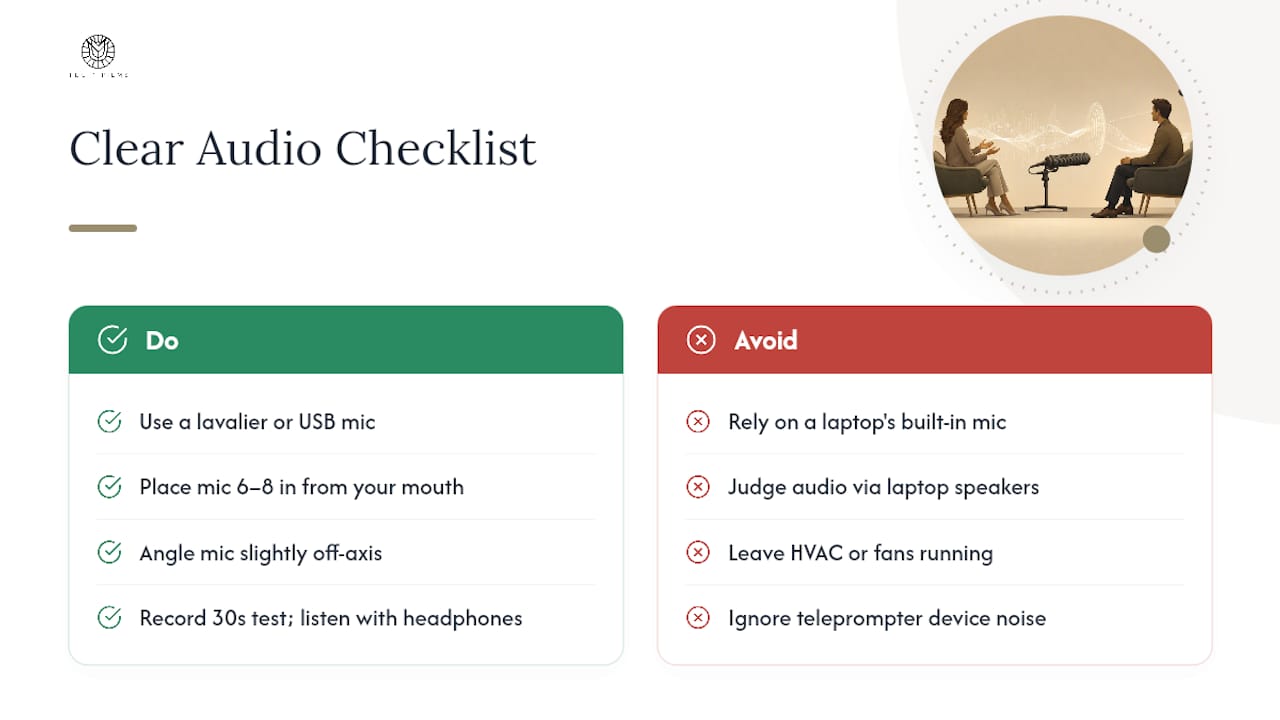
A clip-on lavalier microphone or a dedicated USB microphone placed close to your mouth beats a laptop’s built-in mic in almost every case, since built-in mics pick up room echo and any noise from the teleprompter device itself, including motor hum from clip-on fans or the faint clicks of a Bluetooth remote. Position the microphone six to eight inches from your mouth if you’re using a handheld or desk-mounted unit, and angle it slightly off-axis to reduce popping on hard consonants.
Record a 30-second test clip and actually listen to it with headphones before your real take. Laptop speakers flatten problems that headphones expose immediately, particularly hiss, hum, or an echo bouncing off a hard-walled room. If you’re recording remotely through a video call platform, check whether the platform’s own noise suppression is helping or hurting. Some aggressive noise cancellation clips the natural tone of your voice, making you sound compressed or robotic.
Close windows and turn off HVAC systems or fans if possible. A quiet room does more for perceived professionalism than any post-production fix. If you’re recording near your teleprompter rig, double check that the device isn’t emitting any fan noise or bumping against its mount audibly. It’s a small detail that ruins otherwise clean footage. Finally, keep a backup recording running on a phone or secondary device. Audio failures are more common than video failures, and a phone recording saved in your pocket has rescued more than one interview.
How Do You Keep Body Language Natural While Reading a Prompter?
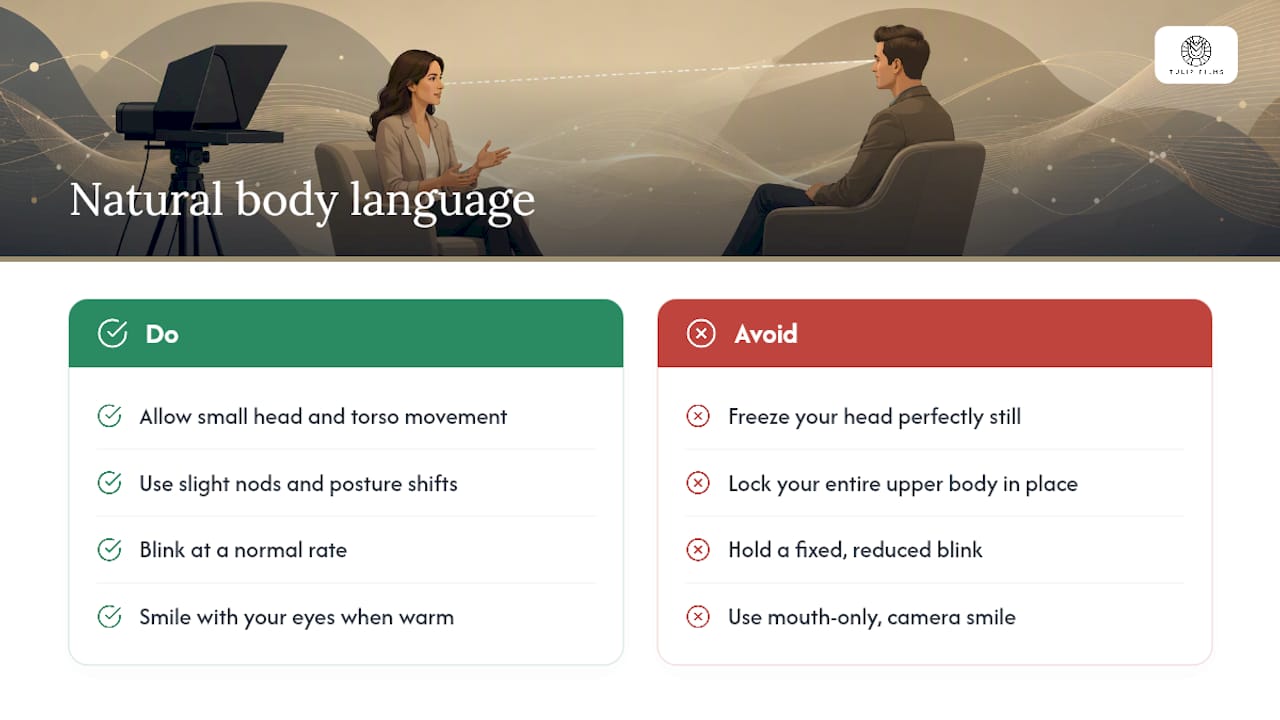
The instinct to lock your head perfectly still while reading a teleprompter is exactly what makes people look stiff on camera. Natural movement, small nods, slight shifts in posture, occasional hand gestures, actually reads as more credible than a frozen, forward-facing stare.
Let your shoulders and torso move slightly as you talk, the way they would in an unscripted conversation. Locking your entire upper body in place to keep your eyes glued to the prompter creates a mannequin effect that viewers notice even if they can’t name why the delivery feels off.
Blink normally. People concentrating hard on reading text tend to blink less, which reads as an unsettling stare on camera. If you catch yourself doing this in a test recording, it usually means your text is too dense or your scroll speed is fighting your natural reading rhythm, both fixable with the cue edits and speed test covered earlier.
Smile with your eyes, not just your mouth, when the content calls for warmth. A genuine smile engages the muscles around the eyes, and viewers can tell the difference between that and a mouth-only smile held for the camera. Practicing your first sentence from memory, mentioned earlier as an anchor for natural tone, also helps your face relax before your eyes ever drop to the prompt.
Hand gestures should match your normal conversational style. If you naturally talk with your hands, suppressing that because you’re worried about staying in frame usually backfires, making you look tense rather than composed. Frame the shot wide enough to allow natural gesture range, and let your body do what it would do in an unscripted conversation.
What Are the Most Common Technical Problems During a Teleprompter Interview?
Most teleprompter failures during an interview trace back to one of four things: app crashes, connectivity drops, mount instability, or scroll desync between the operator and the speaker.
App crashes happen most often on older phones running multiple background processes. Close every other app before recording, and if the interview matters enough, keep a second device loaded with the same script as backup. A browser-based prompter running in a second tab works as a fast fallback if a native app fails mid-session.
Connectivity issues mainly affect remote interviews run through video call platforms with a synced prompter overlay. If your internet connection is unstable, switch to a locally running app rather than a cloud-synced one, so a dropped connection doesn’t take your script down with it.
Mount instability shows up as a shaky or drifting text field, usually from a lightweight tripod or a clip mechanism that loosens over time. Test the mount by tapping the surface it’s attached to. If the phone visibly wobbles, add a counterweight or switch to a heavier base before recording.
Scroll desync, where the text moves faster or slower than you’re actually speaking, usually means your rehearsed pace has drifted from your calibrated speed. This is exactly why the third rehearsal rep with real interruptions matters: unpredictable pacing during practice reveals scroll problems before they show up during the actual interview. If desync happens live, don’t chase the scroll. Pause, let the text catch up or manually adjust if you’re on a remote-controlled app, then continue from your last clear cue point.
What Should You Check Before Recording an Interview With a Teleprompter?
A five-minute checklist run right before recording catches almost every problem covered above, and running it every time, even for a routine interview, is what separates a clean take from three retakes.
Confirm your script is loaded and formatted correctly, with bolded key words and no leftover full sentences you meant to trim. Run the 20-second scroll test one final time at your actual recording distance, since lighting and seating position can shift the read compared to your last rehearsal.
Check your eye line against the lens one more time, especially if you adjusted your seat height or camera angle since your last test. Do a 30-second audio test and listen back with headphones, checking for hum, echo, or any noise coming from the prompter mount itself.
Verify your device battery levels, both the prompter device and any recording device, and have a charger within reach regardless of reported battery percentage. Check that your backup recording device, if you’re using one, is actually recording and not just powered on.
Finally, do one full run-through at real pace, including a simulated interruption if someone is available to throw one at you. This is the step people skip when they’re short on time, and it’s the one most likely to catch a problem before it becomes a visible mistake in the actual interview.
A Note From the Field
Most client sessions we’ve worked on hit the same wall: the person reads their prompter instead of talking to the camera, and it shows immediately in playback. Cue-card style prompts fix that almost every time, because there’s nothing dense enough left on the screen to fall back into reading mode.
— Pieter
Tulipfilms Can Handle the Setup So You Don’t Have To
Getting the eye line, scroll speed, lighting, and audio all correct in one session is harder than it looks, and most people only discover the gaps when they’re already reviewing footage they can’t reshoot. Interview and corporate video sessions are available where the teleprompter, camera framing, and sound are handled by a crew experienced in this work, rather than it being a solo setup shortly before a call.
[
A consult covers your script structure, the on-camera setup, and a shot plan suited to how the footage will be used, whether that’s a leadership interview, a client testimonial, or a training video. Browse the corporate video production portfolio for examples of interview-style work, or check current pricing packages if you’re ready to scope a project. Book a consult to get a shot plan built around your actual interview format, not a generic template.
Sources
FAQ
What Is the 30-60-90 Rule in an Interview?
It’s a structured plan covering your first 30, 60, and 90 days in a new role, typically presented as a one-page document in final-round interviews for senior positions. It’s a separate prep tool from teleprompter cues, though the same short, headline-first formatting applies to both.
What Is the Biggest Red Flag When Being Interviewed?
Mechanical delivery patterns, such as consistent multi-second pauses before every answer and eye movement that looks like reading rather than thinking, are considered strong signals of scripted or AI-assisted responses. Cue-card style prompts, rehearsed with natural pacing, avoid this pattern because you’re speaking from memory rather than reading verbatim text.
Can You Read a Script During an Interview?
Reading a full script word-for-word usually sounds flat and disengaged on camera, which is why the standard approach for a teleprompter interview is short cues and key messages rather than complete sentences. Bolded headline prompts let you speak naturally while the teleprompter only holds your structure.
Does Donald Trump Use a Teleprompter for His Speeches?
Public figures across politics and business regularly use teleprompters for formal speeches and remarks, though usage varies by speaker and setting. The same principle applies to any speaker: a teleprompter works best as a structural aid rather than a script read verbatim.
What Scroll Speed Should I Use for a Recorded Interview?
Aim for 120 to 140 words per minute for most recorded interview formats, adjusting slightly faster for conversational back-and-forth and slower for technical content. Test with a 20-second recorded clip and adjust until your measured rate matches your target.
Recommended
